
How to Set Up a Direct Deposit Account Fast
How to Set Up a Direct Deposit Account Fast ! Decorative title card illustration with financial elements Direct deposit is an ACH credit transaction that moves funds electronically from a payer's bank directly into your account, eliminating paper checks and mail delays.
Direct deposit is an ACH credit transaction that moves funds electronically from a payer’s bank directly into your account, eliminating paper checks and mail delays. When you set up a direct deposit account correctly, you get paid faster, reduce the risk of lost or stolen checks, and gain earlier access to your money. Banks like Wells Fargo and Bank of America, along with government portals like the SSA’s my Social Security platform, have made the direct deposit setup process more accessible than ever. This guide covers every step, from gathering documents to confirming your first deposit.
What do you need to set up direct deposit?
The requirements for direct deposit are straightforward, but getting them exactly right is what separates a smooth setup from a delayed paycheck. You need three core pieces of information before you fill out any form.
The essentials you must have ready:
- Bank routing number (ACH routing). This is a 9-digit number specific to your bank and the type of transaction. ACH routing numbers are not the same as wire transfer routing numbers. Using the wire routing number is one of the most common mistakes people make, and ACH systems will reject it outright.
- Account number. This is the unique number tied to your specific checking or savings account. Double-check it digit by digit before submitting.
- Account type. You must specify whether the funds go to a checking or savings account. Most employers default to checking unless you indicate otherwise.
Beyond those three items, you will need a direct deposit authorization form. Your employer or payer typically provides this. Many major banks, including Chase, Wells Fargo, and Bank of America, offer pre-filled direct deposit forms through their mobile apps or online banking portals. These auto-populated forms pull your routing and account numbers directly from your account records, which significantly reduces the chance of a transcription error.
A voided check is another accepted method. Write “VOID” in large letters across a blank check and attach it to your form. The check contains your routing and account numbers printed in magnetic ink at the bottom, giving your employer a verified source of that information.

Pro Tip: Never rely on memory when entering your routing or account number. Pull the number directly from your bank’s official app or a printed bank statement. One wrong digit causes a rejected payment.
If you receive Social Security benefits, the SSA’s my Social Security portal lets you set up or change direct deposit entirely online without visiting a branch or calling an agent. That is a significant time saver for retirees and disability recipients.
How do you complete the direct deposit setup process?
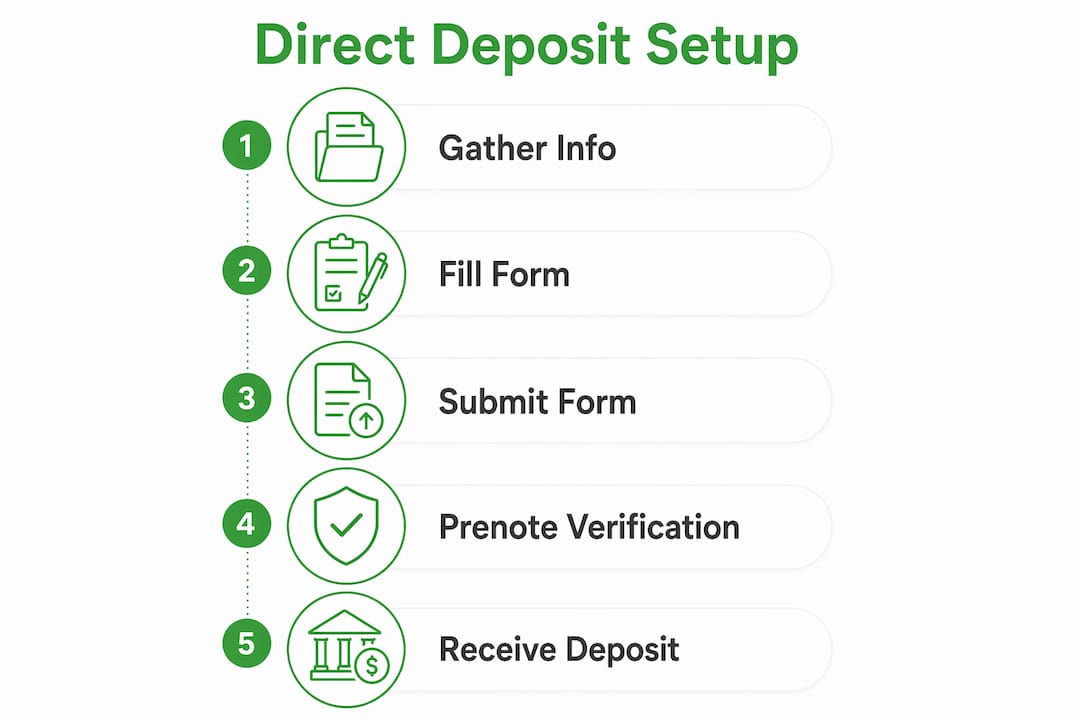
The direct deposit setup process follows a predictable sequence. Knowing each step in advance prevents the confusion that causes most delays.
-
Obtain the authorization form. Ask your employer’s HR or payroll department for a direct deposit form. Alternatively, download a pre-filled form from your bank’s app or online portal. Banks like Chase and Wells Fargo generate these forms in seconds under account settings.
-
Fill in your banking details accurately. Enter your ACH routing number, account number, and account type. If your employer allows split deposits, you can direct a percentage to savings and the remainder to checking. Confirm every number before moving to the next field.
-
Attach supporting documentation if required. Some employers require a voided check or a bank-issued letter confirming your account details. Check your employer’s specific requirements before submitting.
-
Submit the form. Most companies accept submissions through a self-service payroll portal such as ADP, Workday, or Paychex. Others require you to hand the form to HR directly. Paper submission is still common in smaller organizations.
-
Wait for the prenote verification period. Many payroll systems send a prenote before live deposits. A prenote is a zero-dollar ACH transaction that validates your routing and account numbers. If no rejection comes back within 3 banking days, live deposits can begin. The total wait is typically 3–10 banking days.
-
Confirm your first deposit. Log into your bank account on your expected pay date and verify the deposit landed. Check the amount, the originating company name, and the date.
Pro Tip: Ask your payroll or HR contact exactly when they process direct deposit changes. If you miss the payroll cutoff date by even one day, your setup may not take effect until the following pay cycle.
Here is a quick reference for the most common submission methods:
| Submission Method | Best For | Typical Processing Time |
|---|---|---|
| Self-service payroll portal | Most salaried employees | 1–2 business days to process |
| HR department paper form | Smaller employers | 3–5 business days |
| Bank app pre-filled form | Any account holder | Immediate form generation |
| SSA my Social Security portal | Social Security recipients | Up to 30 days for first deposit |
What are the most common direct deposit mistakes?
Most direct deposit failures trace back to a small set of preventable errors. Knowing them in advance saves you from a missed paycheck.
- Using the wire routing number instead of the ACH routing number. These numbers look similar but serve different systems. Wire routing numbers are not accepted by ACH networks. Find your ACH routing number on your bank’s website or app under account details, not on a wire transfer instruction sheet.
- Transposing digits in the account number. A single swapped digit sends your payment to a different account or triggers a return. Always verify the number from an official source.
- Expecting the first deposit immediately. The prenote period adds time. Direct deposit changes do not take effect immediately. Verification and payroll cycles can delay your first deposit by a full pay period.
- Closing your old account too soon. If you are switching banks, keep your old account open until at least one successful deposit confirms in the new account. Closing early risks a missed payment with nowhere to land.
- Submitting an incomplete form. Missing a signature, account type selection, or employer ID number causes the form to be rejected without notice in some payroll systems.
If the IRS rejects your direct deposit for a tax refund, you will receive a CP53E notice giving you 30 days to update your banking information through your IRS Online Account. If you do not act within that window, the IRS issues a paper check, which can take an additional six weeks to arrive.
Monitor your account after every setup change. Catching a rejected deposit on day one gives you time to correct it before the next pay cycle. Passive waiting is the slowest path to resolution.
How does direct deposit work behind the scenes?
Understanding the mechanics of direct deposit helps you set realistic expectations and avoid frustration when timing does not go as planned.
Direct deposit functions as an ACH credit. Your employer or payer initiates a credit instruction through the ACH network, which routes the payment to your bank. Your bank then credits your account on the scheduled settlement date. The entire chain depends on accurate routing and account information at every step.
Prenotes play a specific role in this chain. A prenote is a zero-dollar test transaction that travels the same path as a live payment. Employers and payroll processors use prenotes as a fraud prevention measure, even though Nacha rules technically make them optional. If the prenote returns an error, the payroll team knows your account details are wrong before any real money moves. Some payroll systems issue paper checks during the prenote period to cover the gap so employees are not left without pay.
Here is how prenote verification compares to live deposit processing:
| Feature | Prenote Transaction | Live ACH Deposit |
|---|---|---|
| Dollar amount | $0.00 | Full payment amount |
| Purpose | Validates routing and account info | Transfers actual funds |
| Required by Nacha | Optional | Required for payment |
| Typical timeline | 3–10 banking days | 1–2 banking days after approval |
| Visible in your account | Usually not visible | Visible as a credit |
Payroll cycles add another layer of timing. Most employers process payroll 2–3 days before the actual pay date. That means your direct deposit setup must be finalized before the payroll processing cutoff, not just before payday. Missing that cutoff by one day pushes your first electronic deposit to the following cycle. Young professionals in particular benefit from understanding how direct deposit savings and payment timing interact with budgeting and cash flow planning.
Key takeaways
Setting up a direct deposit account correctly requires accurate ACH banking details, timely form submission, and patience through the prenote verification period before your first electronic payment arrives.
| Point | Details |
|---|---|
| Use the ACH routing number | The wire routing number is not accepted by ACH systems and will cause payment rejection. |
| Gather documents first | Have your routing number, account number, and account type confirmed before filling out any form. |
| Expect a prenote delay | Verification adds 3–10 banking days before your first live deposit arrives. |
| Keep your old account open | Do not close a previous bank account until one successful deposit confirms in the new account. |
| Monitor after setup | Check your account on the expected pay date and act immediately if a deposit does not appear. |
Set up direct deposit with Rmous bank
Rmous makes the direct deposit experience straightforward for members who want their money on time, every time. Rmous Bank offers FDIC-insured checking and savings accounts built for people who rely on electronic payments as their primary way to receive funds. Through the MyRMO digital banking platform, members can access pre-filled direct deposit authorization forms in seconds, reducing the risk of errors that delay payments. Every account is backed by FDIC insurance, giving you the security you need when routing your paycheck or government benefits.
Rmous also supports members through RMOPay™, which enables instant transfers between members when a payment gap arises during a setup transition. If you are ready to open a reliable account for your direct deposit needs, Rmous Bank is built for exactly that.
FAQ
What information do i need to open direct deposit?
You need your bank’s ACH routing number, your account number, and your account type (checking or savings). Some payers also require a voided check or a bank-issued pre-filled form to verify the details.
How long does the direct deposit setup process take?
Setup typically takes 3–10 banking days due to the prenote verification period. Your first live deposit may not arrive until the following pay cycle if you miss your employer’s payroll processing cutoff.
What happens if my direct deposit is rejected?
If the IRS rejects your deposit, you receive a CP53E notice with 30 days to correct your banking information. For employer payroll rejections, contact HR immediately and resubmit corrected account details to avoid a missed pay cycle.
Can i set up direct deposit for social security online?
Yes. The SSA’s my Social Security portal allows you to set up or change your direct deposit information entirely online without visiting a branch or calling the Social Security Administration.
Why is my direct deposit not showing up on payday?
The most common causes are a missed payroll cutoff date, an active prenote period, or a rejected account number. Log into your bank account to check for any returned transactions and contact your payroll department the same day if no deposit appears.